
How to install mods on a Barotrauma server
Last updated:
 Create your Barotrauma server today!
Contents
Before installing mods, be sure to completely stop the Barotrauma server. If the server is already running, the changes may not apply correctly or may be overwritten on the next start.
How to install mods via Steam Workshop
In the Barotrauma server menu, there is a section calledSteam Workshop. This is the main and easiest way to connect mods to the server. You do not need to manually unpack archives or copy files into the game folders — just specify the required Workshop ID.
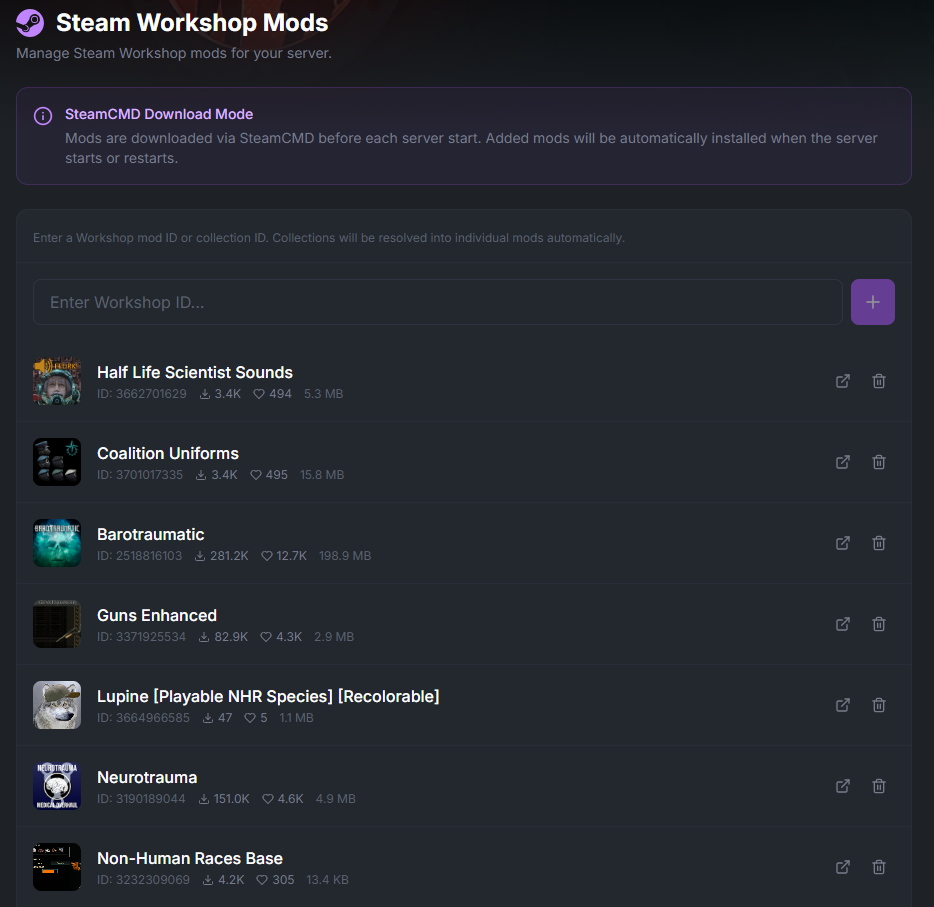
In this section, you can add one of two options:
single mod IDfrom Steam Workshop;
collection IDif you want to connect a whole set of mods at once.
Step-by-step installation

Completely shut down the server.
Open the server settings and go to theSteam Workshop section.
Paste theID of a single modorcollection ID.
Save the changes.
Start the server again.
After startup, the server will download all the necessary mods itself and automatically write them to the fileconfig_player.xml.
If you already have a ready-made build
If a ready-made build with mods has already been uploaded to the server, no additional setup is needed. When the server starts, the mods will be detected automatically and updated if necessary.
What to keep in mind
The server must be turned off before installing mods.
Use the correct mod or collection ID from Steam Workshop.
After startup, check that the server had time to download all the files.
If you change the mod set, restart the server again after saving the settings.
Summary
To install mods on a Barotrauma server, just stop the server, specify the required Workshop ID or collection ID in the settings, and start the server again. After that, the game will download the mods itself, write them toconfig_player.xml, and update the ready-made build if necessary.