How to Become the Owner of Your RuneScape: Dragonwilds Server (Owner ID)
Last updated:
 Create your RuneScape: Dragonwilds server today!
Contents
A RuneScape: Dragonwilds dedicated server is tied to one player: its owner. The owner is the player whose Player ID matches the Owner ID set in the server configuration. Without an Owner ID the server will not start and will not show up in the server list, so this is the first thing to set up on a new server.
What is the Owner ID?
The Owner ID is simply your RuneScape: Dragonwilds Player ID, a long string of letters and digits that identifies your account in the game. You enter it into the server settings once, and the server then recognizes you as its owner.
Keep in mind:
The ID is taken from the game client. The server itself cannot generate it for you.
Only one Owner ID can be set per server.
The Owner ID is not the same as the admin password. The admin password is a separate setting that lets other players open the Server Management tab.
Find your Player ID in the game
Launch RuneScape: Dragonwilds on the account you want to make the owner.
Open Settings from the main menu.
Scroll to the very bottom of the Settings menu. Your Player ID is displayed there.
Click the copy button next to it to put the ID into your clipboard.
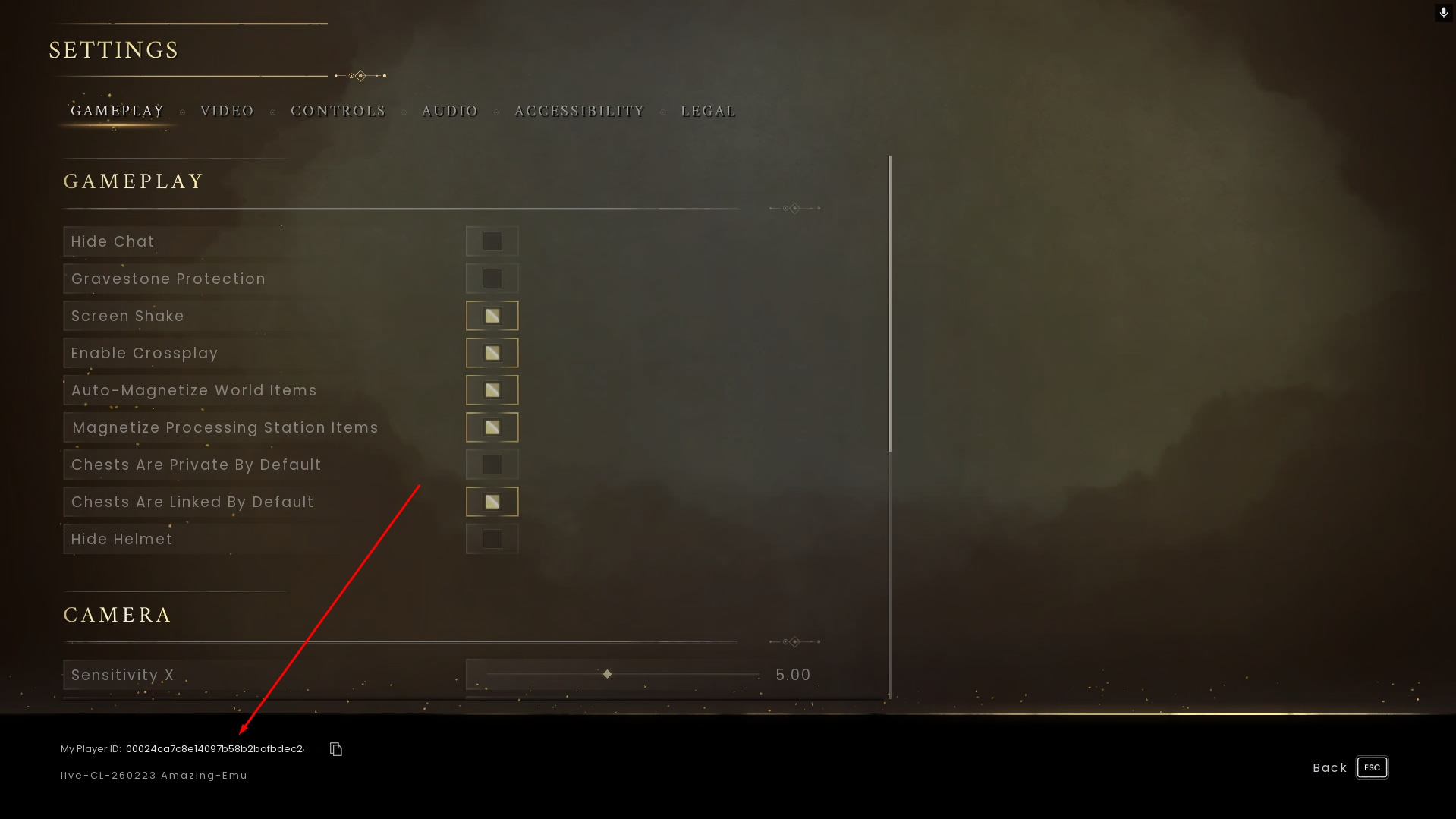
Use the copy button instead of typing the ID by hand: a single wrong character means the server will not recognize you as the owner.
Enter the Owner ID in the server settings
Log in to the NodePlay game panel and open your RuneScape: Dragonwilds server.
Stop the server. Changes made while the server is running can be lost.
Open the server settings and find the Owner ID field (it is the
OwnerIdsetting of theDedicatedServer.inifile).Paste the Player ID you copied in the game.
Save the changes.
Start the server.
If you edit DedicatedServer.ini manually
If you set the value directly in the config file, the line looks like this:
[/Script/Dominion.DedicatedServerSettings]
OwnerId=YOUR_PLAYER_ID
Replace YOUR_PLAYER_ID with the ID you copied. Do not add quotes or spaces.